What Is OpenBridge Designer?
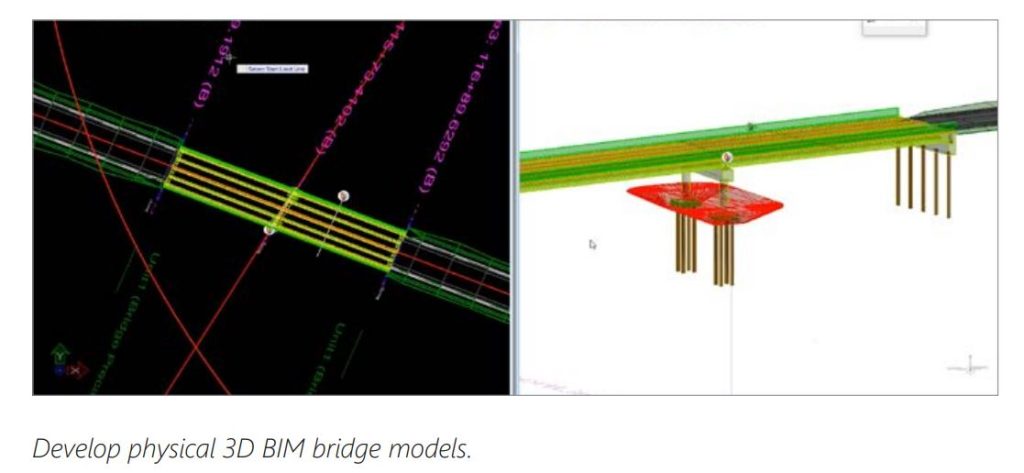
OpenBridge Designer is a fully integrated application that produces deliverables derived directly from the bridge models. Use one product to create physical and analytical models throughout the lifecycle of all bridge types. Create a true BIM model at the beginning of a bridge project to improve design quality, constructability, and collaboration.
Tailor-Made Software
Create specific objects and information for bridge projects in one comprehensive, infrastructure specific application with automated modeling and analysis tools. No more scripting, workarounds, multiple applications, or specialists required.
Multi-Discipline Collaboration
Coordinate with multi-discipline teams to prevent conflicts early in the design phase. No more data transfers, no more communication lags, and no more cost overruns. Improve efficiency, quality, and costly delays with always up-to-date data.
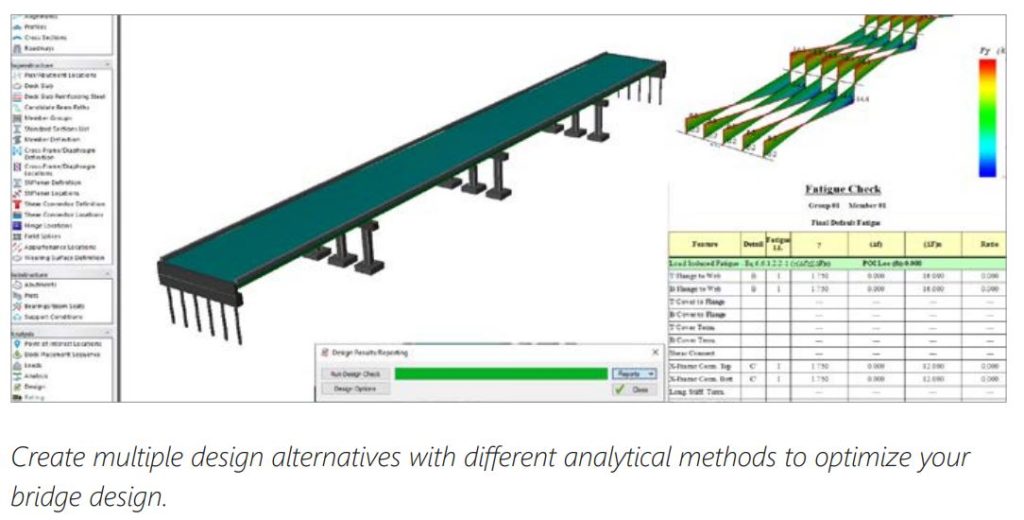
OpenBridge Designer is a fully integrated modeling, analysis, and design application that produces deliverables derived directly from the 3D model, improving bridge constructability and ensuring smooth project delivery. The application utilizes the modeling capabilities of OpenBridge Modeler® and the analysis and design features of LEAP® and RM Bridge to meet all design and construction needs. With this application, you can use one product to create an interoperable physical and analytical model to use throughout the bridge lifecycle.
Produce Intelligent Models
OpenBridge Designer produces intelligent, parametric models that are rich in engineering content properties for various bridge components. The application reuses data from various stakeholders, thus maintaining relevant and up-to-date geometry within a single model. It allows you to specify the construction sequence of the bridge for analysis and design as a true 3D solution, as well as perform clash detection with other structures, objects, and underground utilities to eliminate problems before they occur.
Complete Bridge Application
Innovative analysis, design, and load-rating functionality come together in one advanced environment in OpenBridge Designer. The direct exchange of project information helps users improve decision-making for design and construction while connecting and enhancing workflow processes. The resulting information provides a rich data asset for as-built documentation, maintenance, and operations. Because of its collaboration and data management, OpenBridge Designer is the ideal solution for professional bridge organizations, construction teams, maintenance and inspection crews, and bridge owner-operators.
Collaboration System
OpenBridge Designer allows direct referencing of DGN models from highway alignments, profiles, and ground information created with OpenRoads™ and OpenRail™ applications, as LandXML and IFC files. If reference data changes, the parametric and rule-based bridge model automatically responds to those changes. You can also perform detailing with ProStructures, review geotechnical information with gINT®, and store and query bridge inspection reports with Bentley’s inspection software. OpenBridge Designer also works seamlessly with ProjectWise®, and you can create a digital twin of your bridge to maximize the collaboration between different teams and disciplines. Also, models built with OpenBridge Designer, facilitate model-based construction workflows and can be easily integrated into SYNCHRO™, allowing virtual construction planning with up-to-the-minute information.
Next Level Delivery
Modeling in a 3D environment helps rapidly verify bridge geometry. The bridge is seen in plan, elevation, and cross-section views. A variety
of deliverables can be generated using OpenBridge Designer. It also facilitates the evaluation of multiple bridge alternatives, construction sequences and costs reports, and well-organized analysis and design reports. You can utilize iTwin® Design Review workflows for 2D and 3D design review in a web-based environment that streamlines review sessions on design work-in-progress deliverables. OpenBridge Designer, with its seamless interoperability with ProStructures, can be used for concrete detailing. OpenBridge Designer also offers a companion installation of LumenRT™ to create stunning visualizations.
OPERATING SYSTEM: The minimum requirements are: Intel® Pentium®-based or AMD Athlon®-based processor
2.5 GHz or greater, Windows 10,11 (64 bit) operating system, minimum 16 GB of memory, minimum 1 GB of video RAM
and minimum 25 GB of hard disk space.
CONNECTIVITY: Internet connectivity is required for downloading the installation files.
EASE OF USE
– Intelligent graphical user interface
– U.S. customary and metric (SI) units
– Comprehensive 3D physical bridge modeling
– User customizable libraries
– Intuitive dialogue driven workflows
– Cross-section template for complex geometry
– Catalog of appurtenances
– Automated bridge creation through Bridge Wizards
MODELING AND VISUALIZATION CAPABILITIES
– All bridge types
– Prestressed concrete, steel I-girder and boxes, segmental, trusses, suspension and cable-stayed bridges
– Superstructure and substructure modeling
– Parametric, intelligent bridge components
– Intuitive, dialogue-driven workflows
– Rule-based and constraint-driven modeling
– Clash detection and clearances
– Solid and transparent views
– Lifelike rendering
– Reference roadway information and ground data
– Construction scheduling and animation
VERSATILE REPORTING OPTIONS
– Customized and dynamic report
– Deck and beam-seat elevations report
– Material quantities report
– Cost estimate report
– Camber diagram
– Formats: 3D, PDF, Microsoft Word, Microsoft Excel, HTML
AUTOMATED DRAWING GENERATION
– DGN and DWG drawings
– Plan and elevation drawings
– Bridge framing plans
– Precast, prestressed concrete girders
– Piers and abutments
Full 4D analysis
– 3D geometry for static and dynamic analysis, including creep, shrinkage, and time effects in schedules
No limitations
– Geometry, boundaries, loading and combination, construction stages, linear dynamics, nonlinear material behavior
– Cables, tendons, beams, springs, and advanced elements
Any structural model
– Plane truss, plane frame, grillage, FEM
Complex analysis
– P-Delta, cable sagging, large displacements
– Nonlinear time history analysis, pushover analysis
– Hydro dynamic analysis
– Wind buffeting in time and frequency domain, wind CFD
– High speed rail
– Optimization
Any materials
– Steel, concrete, and composite structures, pre-/post-tensioning
Any erection method
– Balanced cantilever, pre-cast segmental, incremental launching, span-by-span, advanced shoring
– 20+ international design codes
The key to your success goes beyond the software you use. It is also dependent on doing business the way that best serves your organization. That is why we have a variety of subscription and license options, as well as 24/7/365 support to ensure you are up and running on your software quickly and continuously. Bentley can work with your organization to build a path forward that supports people, process, and technology. Unlike others in the industry, we provide innovative subscription programs that are designed to ensure that your team is equipped
to do their work and receive timely support from product experts. Choose from term licensing, use-based pricing, hosted and on-premise services, and cloud services, all of which include use analysis and the flexibility to pivot as needed.
Civil Worksuite Applications
Contact Us
SOHO Pancoran, South Jakarta
Block Splendor Wing, 28th Floor
Unit S-2803, South Jakarta, 12810